New in DormWay · Course AI Use Label
Can I use AI for this assignment?
The same tool can be allowed on an exam in one course and banned for brainstorming in another. DormWay now reads each course’s AI rules from its syllabus and shows them task by task.
Course AI Use Label
Sample Course 101
Fall 2026 · Course-wide rules
- Private study / conceptsAllowed
- Brainstorming / outliningAllowed
- Editing your own workLimited
- Coding help / debuggingApproval required
- Generating submitted textNot allowed
- Generating images / mediaLimited
- Quizzes / testsNot allowed
- Exams, incl. take-homeNot allowed
Disclosure: name the tool and keep your prompts. Not specified? Ask the instructor.
Illustrative example; not a real course.
What we found
Most syllabi have AI rules. They rarely say the same thing.
We screened 12,920 candidate Fall 2026 syllabus transcripts and corrected the results with a random source-review sample. Estimates for eligible, policy-evaluable transcripts:
contain an operative AI-use policy
95% interval: 73.2–77.4%
default to a ban with exceptions, or allow AI only for certain tasks
95% interval: 31.1–36.6%
have mixed or unclear permission rules
95% interval: 9.2–14.2%
The measures overlap and are not slices of one pie. They describe DormWay’s filtered syllabus collection, not national prevalence or student confusion. Review was agent-assisted, not human-coded. How we checked.
Same tool, different rules
Two courses at one university
Public Fall 2026 syllabi from Texas A&M International University. A creative-writing course bans AI throughout its process; a multimedia course encourages it with attribution.
DormWay summaries of the public AI sections, not instructor-confirmed. “Not specified” means the AI section doesn’t settle it; it does not grant permission. Sources: ENGL 3307 and COMM 3332, checked October 15, 2026.
In the DormWay app
The rule for each task, on the course page
Add your syllabus
Upload the syllabus for a course, the same way you add deadlines and class times.
DormWay reads the AI rules
It finds the course’s AI policy and sorts it task by task: studying, brainstorming, editing, submitted work, quizzes and exams.
Check the label, then the source
The label sits on the course page with each status and its conditions, linked back to the syllabus it came from.
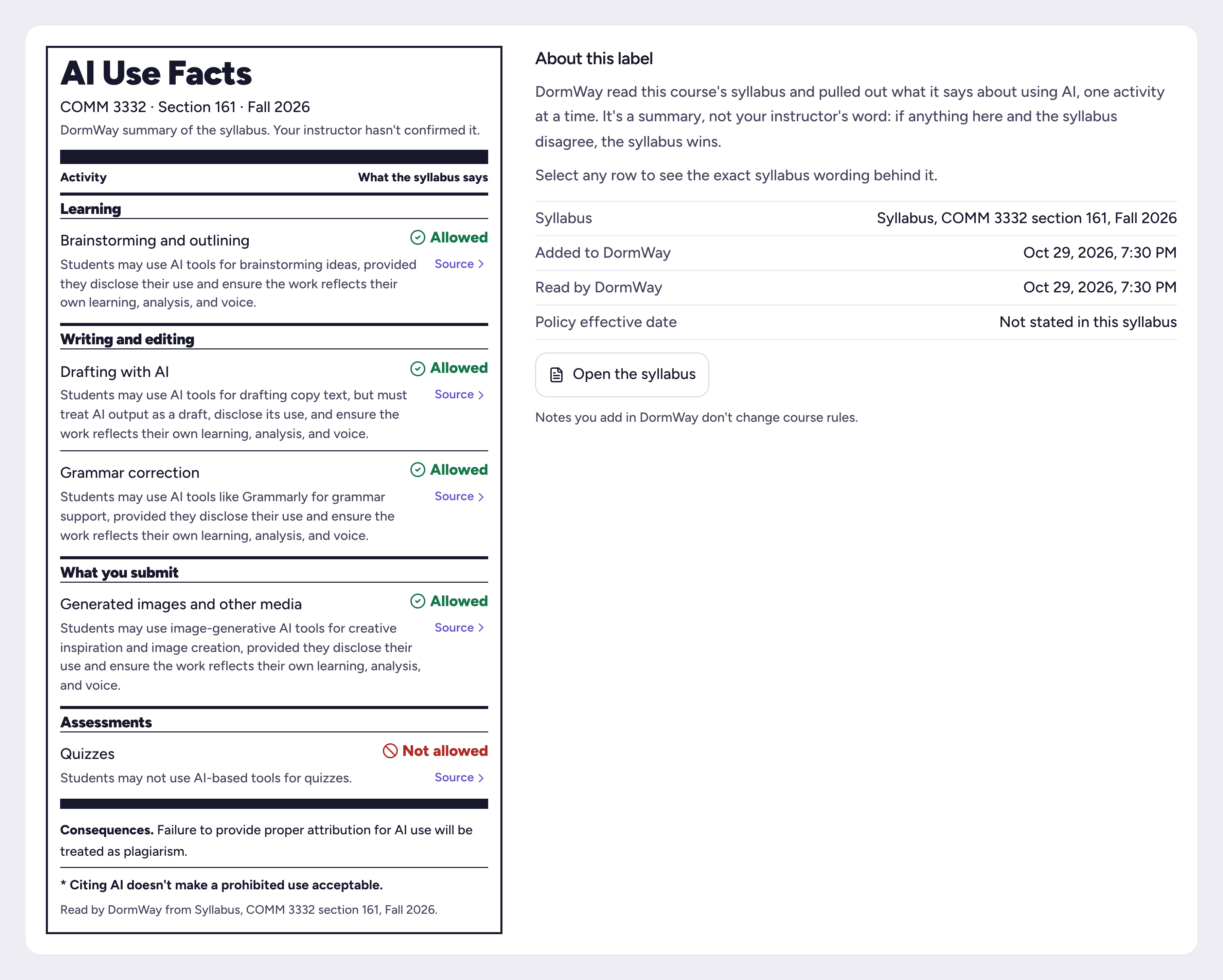
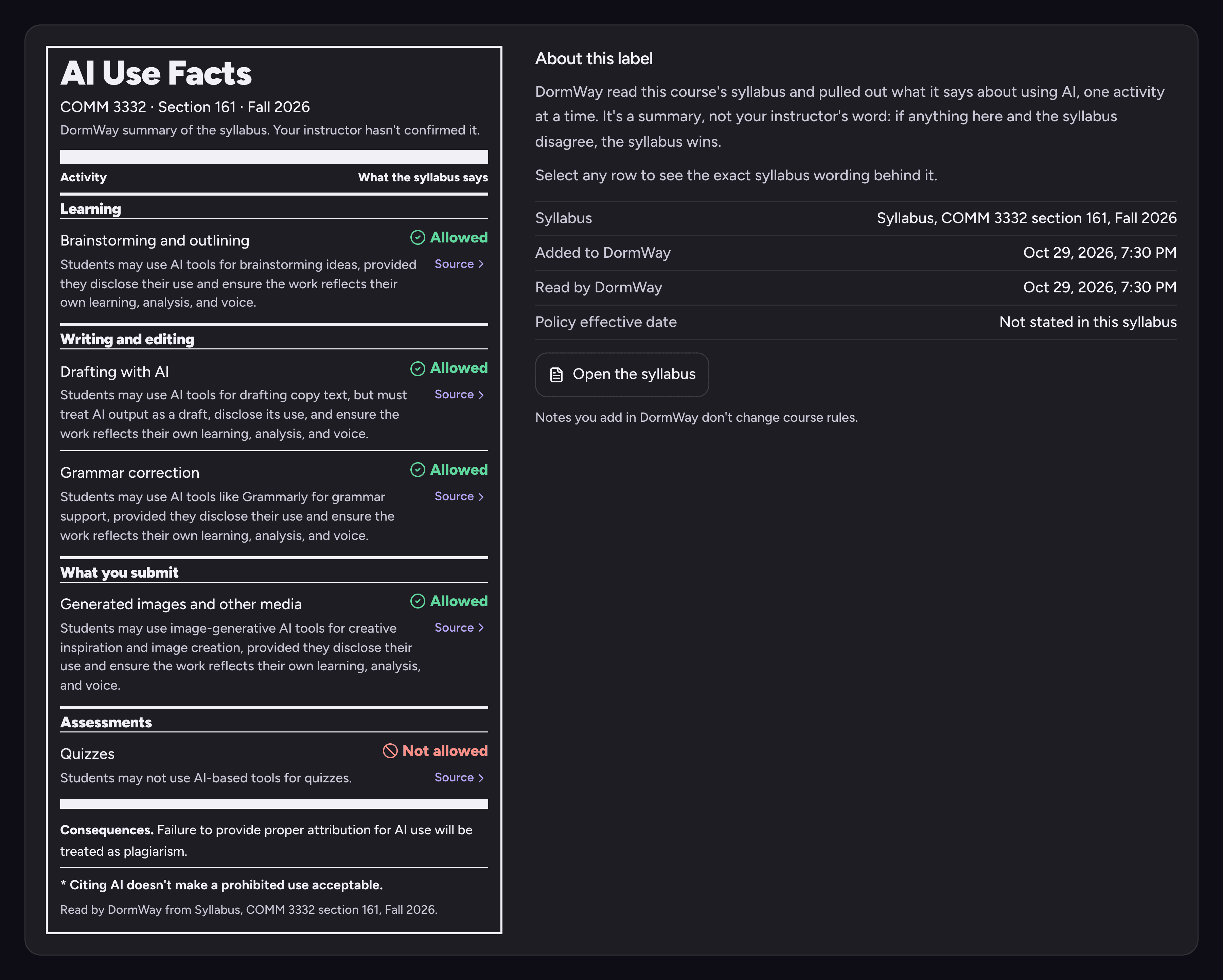
On the web, iPhone and Mac. The label is an automated summary, not instructor confirmation; the syllabus and your instructor’s instructions govern. Labels appear for syllabi DormWay has read since launch. A course added earlier gets one when its syllabus is uploaded again. If DormWay can’t read the AI rules, the course page shows no label rather than a guess.
“Students should be able to find the rules before they start an assignment. A consistent label makes those expectations easier to check and helps students understand where responsible AI practice fits into their education.”
For faculty and students
Fill in the label by hand
The free template has the same task rows and statuses. Instructors can publish it with a syllabus; students can ask an instructor to complete or confirm it. A blank template grants no permission.
How to complete it · Seven questions to check before using AI · Or fill it in online
Make a label
Fill in the label online
Choose a status for each task, add conditions, then print it, save it as a PDF, copy it into a syllabus or download it as HTML. It runs in your browser: no account, and nothing you type is sent or saved.
A generated label grants no permission on its own and is only as accurate as what is entered. Students: confirm it with your instructor.
Your label
Updates as you type. Nothing you enter leaves this page.
AI Use Facts
Course AI Use Label
- Course / section
- —
- Term
- —
- Instructor / contact
- —
- Scope
- —
- Effective date / version
- —
- Private study / concept explanationNot specified
- Brainstorming / outliningNot specified
- Editing / rewriting your own workNot specified
- Coding assistance / debuggingNot specified
- Generating submitted text or codeNot specified
- Generating submitted images / other mediaNot specified
- Quizzes / testsNot specified
- Exams, including take-homeNot specified
- Disclosure and evidence
- —
- Advance approval
- —
- Approved tools and prohibited tools
- —
- Upload restrictions
- —
- Governing sources
- —
This label grants no permission by itself. “Not specified” is not permission: ask the instructor before using AI, and keep the answer. The syllabus, assignment instructions and institutional policy govern if they differ from this label.
Made with the DormWay Course AI Use Label template (v1.0). Not an adopted institutional standard; no DormWay or institutional approval is implied.
Show as text (Markdown)
The label is not an adopted standard, and its effectiveness has not been tested. No university endorsement or partnership is implied.